JAMS Scheduler V7.9.5: JAX AI and JAMS MCP Now Build and Maintain Jobs, with Your Permission
A new job in JAMS Scheduler needs more than a name and a script. It needs a schedule, the dependencies that gate it, the alerts that fire when it fails, and the parameters it runs with. Until now, each of those meant another screen.
In July, we released JAX AI and JAMS MCP with read access and run management. Both could find jobs, diagnose failures, and hold, release, or cancel runs. With JAMS Scheduler V7.9.5, available November 23, both can also set up and maintain the jobs and schedules behind those runs.
The way they act did not change. Every action runs as the signed-in user, with that user’s permissions, and the JAMS audit trail records it.
“Setting up a job used to mean an agent on one screen, job source on another, and an alert or schedule on a third. With V7.9.5, you describe what you need, and JAX AI lays out each change for you to review. It runs as you, it asks before it saves, and the audit trail records every change, the same as when you make the change yourself.”
Dan Fowle, Product Manager, JAMS Software
JAX AI sets up the job after you approve
JAX AI is the AI agent with guardrails built into the JAMS Scheduler Web Client. Ask it for a schedule the way you would ask a colleague: “Run this every workday at 8 AM, wait for the upstream load, and email operations if it fails.” JAX AI works out the trigger, the dependency, and the alert for you.
In V7.9.5, JAX AI can build a complete job from one request. It creates the job; adds its schedules, triggers, dependencies, notifications, recovery steps, and parameters; and, for PowerShell jobs, writes the script. For jobs you already have, it can rename jobs and folders, turn scheduling on or off, reset triggers, and update triggers, dependencies, time windows, event handlers, reports, and parameters.
JAX AI does not guess. If your request leaves something out, it asks before it starts. If more than one option fits, such as several PowerShell job types, it asks which one you mean. Before you approve anything, it flags name collisions, inherited settings, and changes that would reach every job in a folder. Then it shows each change, one at a time, and waits for your approval.
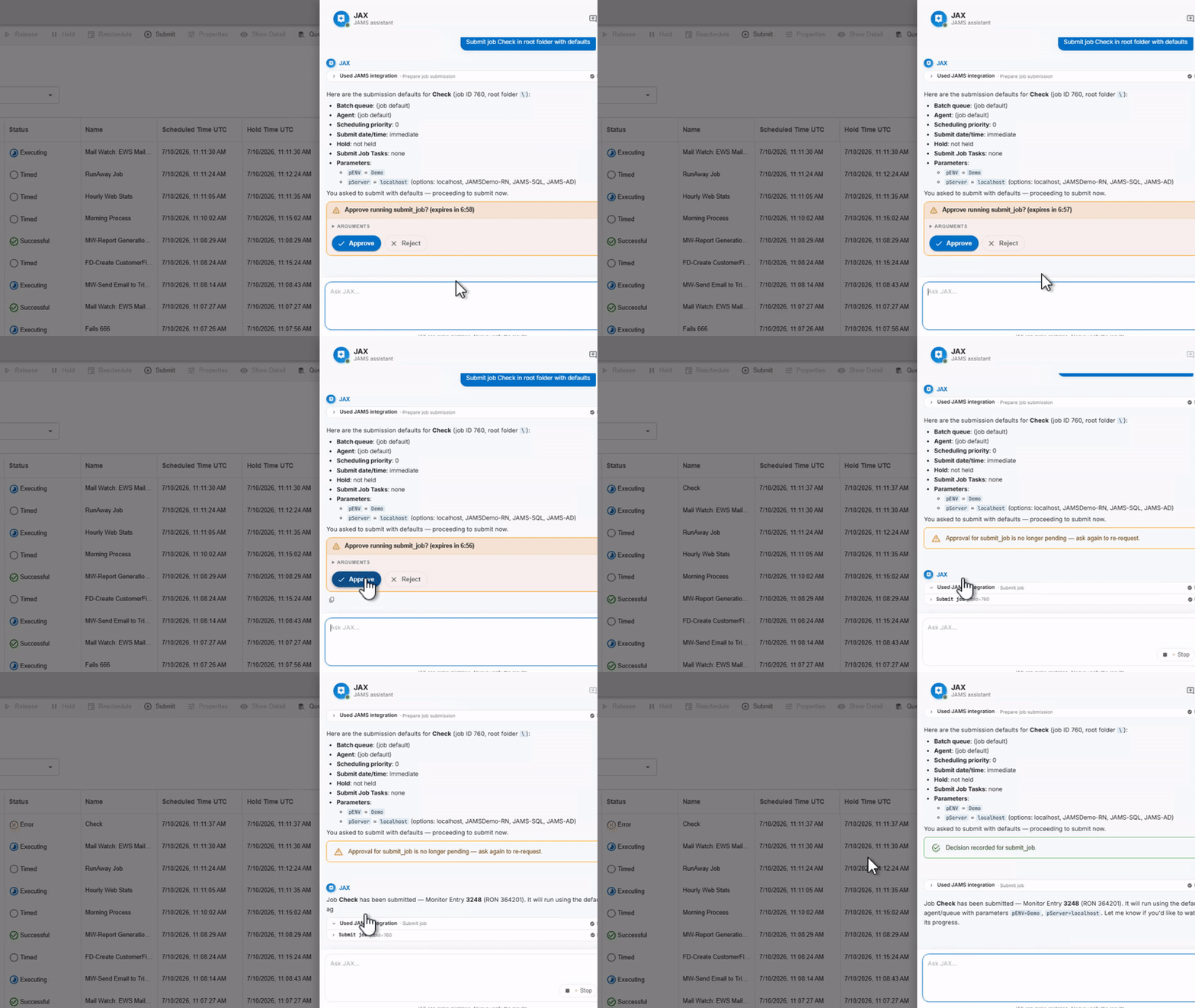
JAX AI lays out what it will change, here the settings for a job submission, and waits for you to approve or reject it.
It also answers bigger questions than it could in July:
SLA risk insights. For any job with an SLA Time or SLA Max Runtime set, JAX AI can tell you whether it is At risk, Will miss, Blocked, or Breached, and why. Ask follow-up questions to see forecast timing, find the upstream bottleneck, and check which dependent jobs with their own SLAs could slip.
Scheduler Health. JAX AI flags a schedule that has stopped extending, entries overdue to start, and memory or handle growth in JAMS Scheduler services, with recommended troubleshooting steps. Memory and handle analysis requires collected service telemetry.
Run history. Execution summaries show outcomes, daily or hourly trends, the top failing and longest-running jobs, and the busiest agents.
When a problem needs our support team, JAX AI summarizes your conversation into a support ticket and pulls in the job logs. You can then add screenshots, review and edit the ticket, and have JAX AI submit it to JAMS Support for you.
JAMS MCP brings the same work into your editor
JAMS MCP is a connector built on the open Model Context Protocol (MCP) standard. It lets Cursor, Claude Code, GitHub Copilot, Claude Desktop, and other MCP clients work with JAMS Scheduler in plain language. It is an integration layer; the intelligence comes from the model your AI client uses.
With V7.9.5, an engineer with a script open in their editor can create the JAMS Scheduler job that runs it. From the same window, they can add its triggers, dependencies, and alerts, and edit scripts for supported jobs, without switching to the console. The investigation tools from July still apply, and the live view no longer stops at 200 entries.
Every request runs as the signed-in user. JAMS Scheduler enforces that user’s permissions and validates each action. Confirmation before a change depends on your AI client and how you configure it, and administrators decide which MCP clients JAMS Scheduler trusts.
We built on MCP because the engineers who use this already choose their own tools. A standard protocol lets JAMS Scheduler work with the client your team picked, and with other MCP clients you adopt later.
You choose the model and where your data goes
Neither JAX AI nor JAMS MCP includes or hosts a model. You choose one: a commercial provider such as OpenAI or Anthropic, or a model you run on your own hardware through Ollama, LM Studio, or another local backend such as vLLM or llama.cpp. JAX AI does not support reasoning or thinking-mode models directly.
That choice decides where your data goes. With a commercial model, what you type and what JAMS Scheduler returns go to that provider, and that provider’s privacy and retention terms apply. With a model inside your network, your data stays inside your network.
JAX AI does not remember past conversations or train a model on your data. Each chat starts fresh, and the changes it makes appear in the Audit Trail like any other change.
JAX AI ships turned off until an administrator turns it on. Both features come with JAMS Scheduler at no extra cost: no separate license, SKU, per-call charge from JAMS, database, or login.
What it still does not do
JAX AI and JAMS MCP do not delete jobs or folders. They do not change a job’s execution method after creation, and they do not author sequences or Workflows, though they can walk a running sequence step by step. They never touch the database directly; they call only the predefined actions JAMS Scheduler allows.
Some features need setup first:
SLA risk can only be evaluated for jobs with an SLA Time or SLA Max Runtime set.
JAX AI and JAMS MCP do not delete jobs or folders, and they do not create or change credentials or agents yet.
Scheduler Health memory and handle analysis needs collected service telemetry.
Report delivery (Email Report, SSRS Print Report) needs a compatible execution host.
Contact Support needs external connectivity from the browser or the JAX AI server, and direct ticket submission needs the Requests API connection.
Also in V7.9.5
Cloud automation. Remote File Triggers start a job when a file arrives in Azure Blob Storage or Amazon S3. A REST execution method calls REST endpoints without scripts, and an Azure VM execution method starts, stops, reboots, and deletes Azure virtual machines.
Web Client. Monitor Flow shows running entries and their dependencies as a live graph. Universal Search finds any object from one box, and Import and Export moves job definitions in and out of the Web Client.
Access. JAMS Scheduler supports Kerberos-only environments and runs jobs under Group Managed Service Accounts (gMSA), so you no longer store and rotate passwords for those jobs.
Before you upgrade: V7.9.5 replaces MSMQ with NATS, and the Legacy Web Client and Legacy API do not work with it. If you rely on either one, stay on V7.9.2 until you move to the current Web Client and REST API.
Read the full release notes
The V7.9.5 release notes cover every new feature, enhancement, fix, and upgrade step, including the NATS port and firewall guidance. Read the JAMS Scheduler V7.9.5 release notes.