
JAMS Incident Management
Incident management software that never misses a page
When something breaks, JAMS Incident Management makes sure the right person picks up, and can retry or resolve the job right from that call, no desk required. Alerts escalate through voice, SMS, WhatsApp, push, email, Microsoft Teams, and Slack until someone acknowledges. It works with any team and any stack, and it’s priced per user so it scales as your team grows.
Not ready to start a trial yet?
Leave your email and a member of our team will reach out to answer questions and help you find the right fit.
Any stack, any team
Fully standalone, with a built-in bonus for JAMS Scheduler teams
You don’t need JAMS Scheduler to use JAMS Incident Management. Alerts come in from monitoring tools, email, webhooks, or the API, and the product handles paging and escalation on its own. If you do run JAMS Scheduler, there’s a built-in bonus: job failures can open incidents automatically, so a failed job becomes a ringing phone with no swivel chair in between. Whoever picks up can retry it right from that call, no laptop needed.
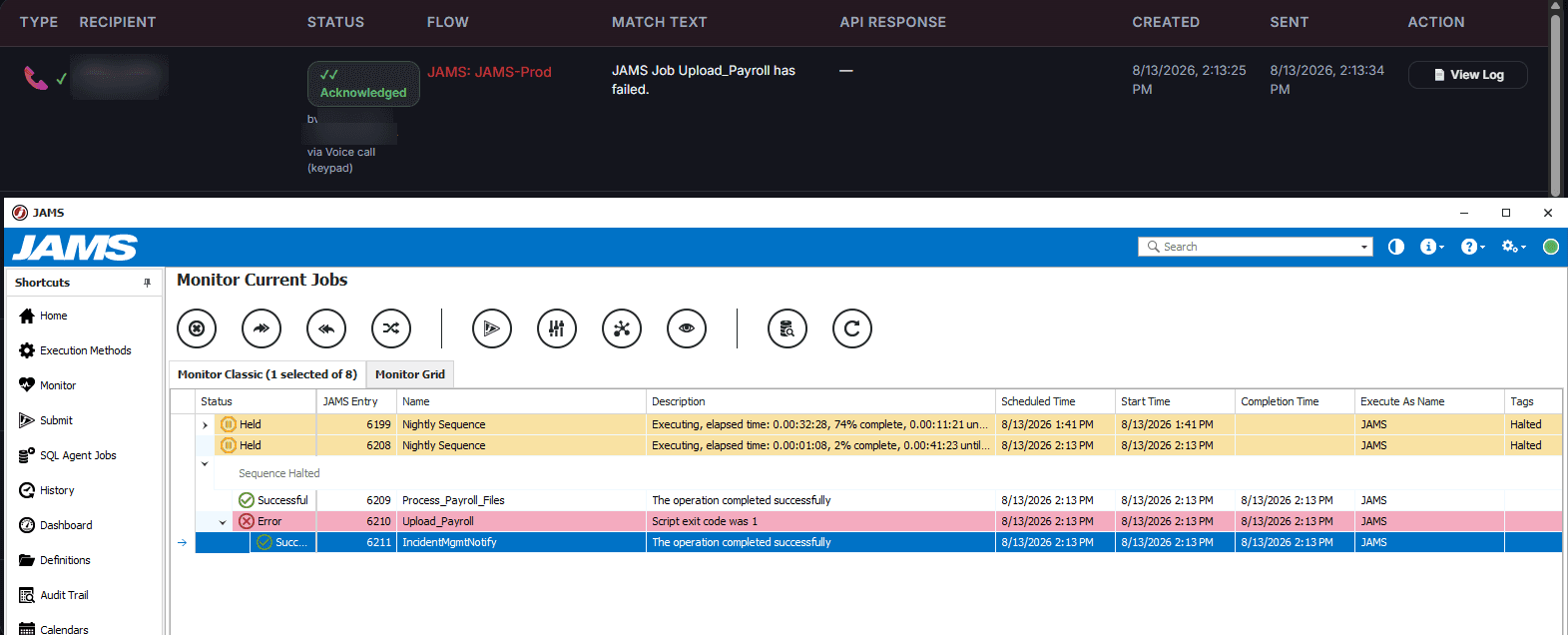
From first alert to acknowledged
Alert routing
Alerting and escalation shouldn’t depend on someone watching a screen
Monitoring tools are good at detecting failures and bad at waking the right human. Email alerts get buried, and group chats scroll past.
A missed page at 2 a.m. becomes an outage measured in hours.
Incident management software exists to close that gap: it turns a raw alert into a phone that rings, an escalation that climbs, and an acknowledgment you can see.
2 a.m.An alert fires
Without incident management
- Email alertBuried
- Group chat messageScrolled past
An outage measured in hours
With JAMS Incident Management
- Phone ringsRinging
- Escalation climbsEscalating
- Acknowledgment you can seeAcknowledged
Beyond job failures
It watches JAMS itself, not just your jobs
Most monitoring assumes the monitoring tool stays up. JAMS Incident Management checks the health of JAMS’s own Windows services (JAMS Executor, JAMS Scheduler, and JAMS Server) directly on the host through a lightweight connector agent. That means the health check still works even if the JAMS REST API itself goes down, since it doesn’t depend on the thing it’s watching to also report on itself. New services are discovered automatically when JAMS is upgraded, but stay unchecked until you turn them on, so an upgrade can’t quietly start paging you at 3 a.m.

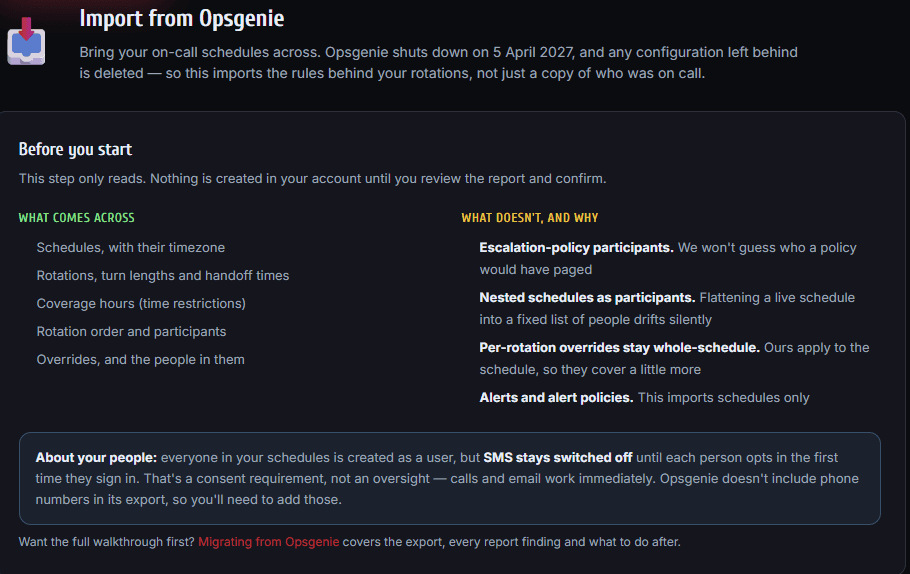
Opsgenie shuts down April 5, 2027
Convert from Opsgenie to JAMS Incident Management in days, not weeks or months.
With our built-in converter, we import your schedules, including time zones, rotation lengths, handoff times, coverage windows, rotation order, and overrides. JAMS Incident Management rebuilds that same rotation logic rather than flattening it into a static list of names. Nothing is created in your account until you’ve reviewed a report and confirmed it. Also, escalation policies aren’t guessed at, and a live schedule nested inside another isn’t collapsed into a fixed list. Everyone imported becomes a user with calls and email active right away. SMS stays off until each person opts in the first time they sign in.
Every channel your team actually answers
Voice
SMS
Push
Microsoft Teams
Slack
Voice and SMS use phone numbers in the US, UK, and Australia today. Email, push, Microsoft Teams, and Slack work anywhere. Two-way integrations with Azure Monitor, ServiceNow, and Zendesk sync acknowledge and resolve actions back to the source system.
Simple per-seat pricing, built to scale with your team
Start with a free 14-day trial, then choose the tier that fits. Set your team size and billing interval below to see exact pricing update in real time.
- 5 SMS or WhatsApp messages per user/month · no voice calls
- 1 flow · 1 on-call schedule
- Unlimited email, push, Teams & Slack alerts
- No SSO
- No premium integrations, AI Helper, or audit trail
No card required. Upgrade when you outgrow it.
- 50 SMS or WhatsApp messages + 10 voice calls per user/month
- Unlimited flows & on-call schedules
- Unlimited email, push, Teams & Slack alerts
- SSO available as an add-on
- No premium integrations, AI Helper, or audit trail
Add SSO, extra SMS or extra voice calls as add-ons.
- 100 SMS or WhatsApp messages + 20 voice calls per user/month
- Unlimited flows & on-call schedules
- Unlimited email, push, Teams & Slack alerts
- Includes SSO
- Includes premium integrations, AI Helper & audit trail
Everything in Starter, plus SSO, premium integrations, AI Helper, and audit trail.
- Customized packaging and pricing for large, enterprise teams
Tailored to your team's needs.
How messaging and voice are counted. Only texts, WhatsApp messages, and phone calls count against your allowances. Email, push, Microsoft Teams, and Slack are unlimited on every plan, including Free. SMS and WhatsApp share one messaging allowance, so you spend it whichever way the recipient is reachable. Each message on each channel counts separately, so reaching one person by both call and text spends one of each, and every additional recipient or escalation step adds more. Both allowances are per user but pooled across your team, so adding someone raises them. We email your admins at 75% and 100% of each allowance. Past a limit, only that allowance pauses until it resets next billing cycle (messaging covers both SMS and WhatsApp), and every other channel keeps delivering. Add users, buy extra SMS, or move up a plan at any time to raise it immediately.
Questions about limits or coverage? See the FAQ
Frequently asked questions
Do I need JAMS Scheduler to use this?
No. JAMS Incident Management is fully standalone. It takes alerts from your monitoring tools, email, webhooks, or API and handles the paging and escalation on its own. If you also run JAMS Scheduler, there's a built-in bonus: job failures can open incidents automatically. That integration is optional, not a requirement.
What happens if I hit my monthly notification limit?
We email your admins at 75% and again at 100% of an allowance, naming the channel affected. You're never locked out: only that allowance pauses, everything else keeps delivering, and it refills at the start of your next period. Running out of messages never stops your calls, email, push, Teams, or Slack. A trial works the same way. Using up your 50 messages (SMS or WhatsApp) or 10 voice calls pauses that channel. It does not end your trial. To get more capacity right away on a paid plan, add seats (messaging and voice scale per seat), buy an SMS or voice top-up, or move up a plan. On a trial, pick a plan and your account continues in place with that plan's allowances.
What counts as one notification?
One notification is a single message to one person on one channel, so each channel you pick for a person counts separately. Reaching someone by both call and WhatsApp is two notifications, and every additional recipient or escalation step adds more. SMS and WhatsApp messages draw from the same messaging allowance. Only messages we actually send count; undelivered attempts don't.
Can JAMS Incident Management send alerts over WhatsApp?
Yes. WhatsApp is one of seven alerting channels, alongside voice, SMS, push, email, Microsoft Teams, and Slack, and it runs through the same escalation policies and on-call schedules. WhatsApp and SMS share one messaging allowance: 5 messages per user a month on Free, 50 on Starter, and 100 on Professional, pooled across your team.
Which countries do you support?
Voice and SMS use phone numbers in the US, UK, and Australia today. Contact us to enable other regions. Email, push, Microsoft Teams, and Slack work anywhere, since they aren't tied to a phone number.
How does the free trial work, and what happens when it ends?
The trial runs 14 days with every feature unlocked and no credit card required, including voice calling, escalation policies, on-call scheduling, and every integration. Email, push, Microsoft Teams, and Slack are unlimited, and you can invite as many teammates as you like. For the metered channels you get 50 messages (SMS or WhatsApp) and 10 voice calls in total for the whole account, not per person, which is enough to test paging properly. If you use them up, messages or calls pause while everything else keeps running. We email your admins at 75% so it isn't a surprise. Running out never ends the trial early. It ends only when the 14 days are up. Picking a plan continues your account in place, with your flows, users, and settings carried over, and allowances that then scale with the seats you buy.
How is my data protected?
Data is encrypted in transit (TLS), and stored provider credentials are encrypted at rest. Each tenant's data is isolated, all access is authenticated, and optional single sign-on (OIDC) and audit logging are available. The service is hosted on Microsoft Azure.
How much does JAMS Incident Management cost?
Pricing is per user, so it scales with your team size. Free covers up to 5 users at no cost, with 25 pooled SMS or WhatsApp messages a month and no voice calls. Starter starts at $6/user/month billed annually for up to 25 users, including 50 SMS or WhatsApp messages and 10 voice calls per user, pooled across the team. Professional starts at $16/user/month billed annually for up to 50 users, with double the messaging and voice allowances plus Azure Monitor, ServiceNow, and Zendesk integrations, SSO, and audit trail included. Enterprise offers customized packaging and pricing for teams of 51 or more. Every plan starts with a free 14-day trial, no credit card required. Monthly billing is also available at a slightly higher per-user rate; annual saves $2/user.
What are the features of JAMS Incident Management?
JAMS Incident Management makes sure someone responds. It takes alerts from your monitoring tools, JAMS Scheduler, Windows services, ServiceNow, Zendesk, email, or an API, reaches the right on-call person by phone call, SMS, WhatsApp, push, email, Teams, or Slack, and keeps escalating until someone acknowledges. On-call schedules and escalation policies decide who that is, and coverage gaps are surfaced before an incident finds them. Recipients can acknowledge, close, or even restart a failed JAMS job straight from the call, and that state syncs back to wherever the alert came from.
Related reading:Introducing JAMS Incident Management
Put an end to the missed page
Free for 14 days. No credit card required. Cancel anytime.


